

Stop blaming your DPI for missed shots. If you play with a fingertip grip, the hidden enemy destroying your precision is likely your mouse’s weight distribution.
Center of Gravity (COG) isn’t just physics jargon; it determines whether your mouse feels like a seamless extension of your hand or a clumsy brick.
In this guide, we break down how front, rear, and neutral balance affect your aim mechanics.
You will learn how to leverage physics to sharpen your reflexes, eliminate sensor spin-outs, and dominate your gaming circle with true 1:1 tracking accuracy.
Key Takeaways
- Center of Gravity dictates the lever effect on your fingers, altering the force needed for micro-adjustments.
- Rear-heavy mice cause sensor-lifting ‘wheelies,’ while front-heavy setups lead to pad-scraping ‘nosedives.’
- A neutral balance point combined with sub-60g weight is the gold standard for effortless fingertip tracking.
- Wireless battery placement must be central to prevent pendulum effects that ruin vertical aim control.
- Use Joltfly’s Aim Trainer and Drift Test to verify if your current setup is fighting your muscle memory.
The Hidden Variable: Why Center of Gravity Defines Fingertip Precision
Most gamers obsess over DPI or switches. But for fingertip grip, the Center of Gravity (COG) is the silent killer of your aim.
COG defines how the mouse moves during micro-adjustments. If the weight is off, your muscle memory fails.
Think of your mouse as a lever. Your fingertips act as the fulcrum. The balance point determines the effort needed to move.
The Physics of Precision
A rear-heavy mouse feels sluggish. It resists your vertical movements and drags against your palm.
A front-heavy mouse acts erratic. It dives nose-first when you lift it for a reset. This forces you to grip harder.
You want a central COG. This makes the mouse feel weightless and responsive, like a true extension of your hand.
This balance interacts directly with your sensor. It changes how your arc movements translate to the screen.
For a deeper dive on this, read our guide on Mouse Sensor Position: Forward vs Rear Aim Secrets.
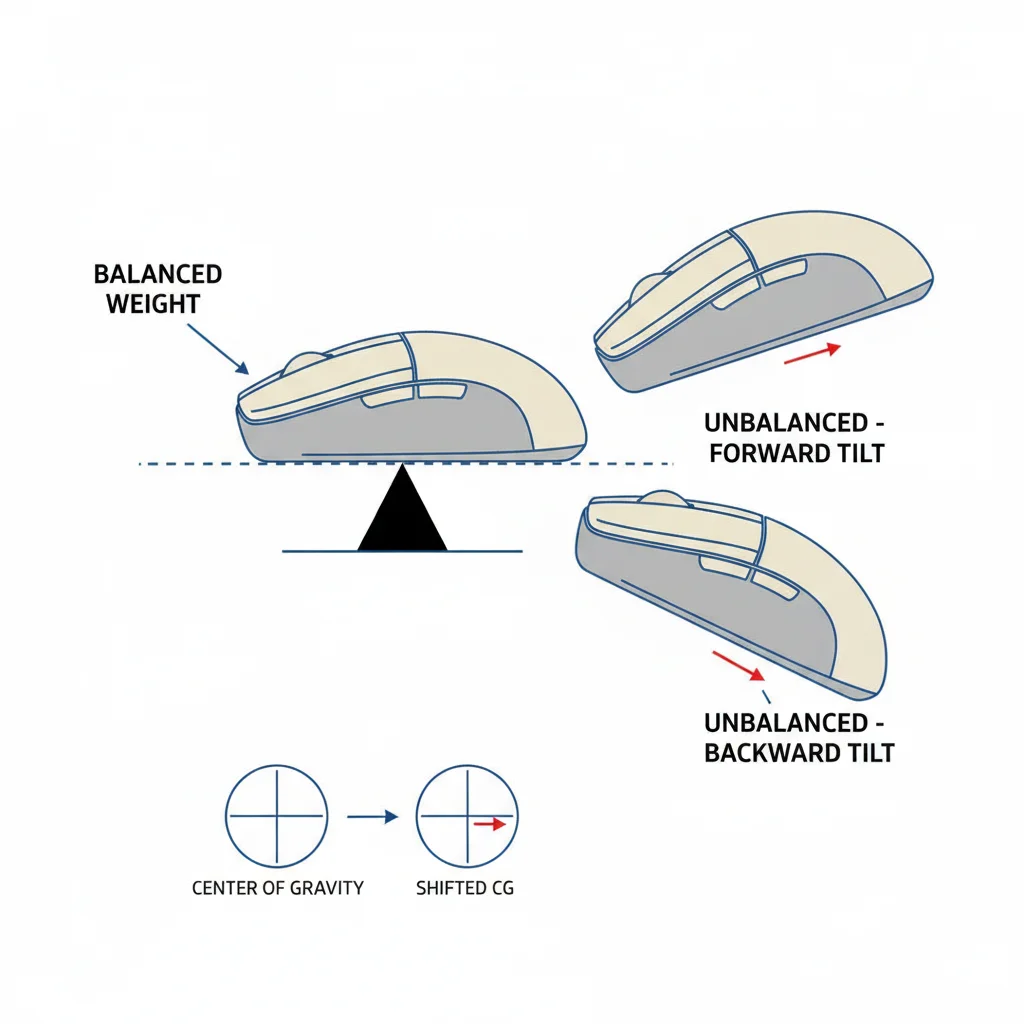
Weight Distribution Impact Table
Here is how different weight biases affect your in-game performance.
| Weight Bias | Fingertip Feel | Aim Consequence |
|---|---|---|
| Front-Heavy | Nose dives on lift-off | Inconsistent vertical tracking |
| Balanced | Neutral and floating | Precise 1:1 movement |
| Rear-Heavy | Drags on mousepad | Lazy crosshair placement |
Pro Trends on Weight and Balance
Professional gamers are shifting rapidly toward lighter, perfectly balanced mice. The data shows a clear trend.
A bar chart showing that 70% of Pro FPS players prefer mice under 70g for better balance and speed.
As you can see, the vast majority of pros prioritize lighter gear. This reduces inertia, making the COG less punishing if it is slightly off.
Test Your Balance
Lift your mouse with just your thumb and pinky in your normal grip position. Does it stay flat?
If it tilts, you are fighting physics every time you snap to a target. You need to adjust your hand position.
Once you find that sweet spot, prove it works. Run a session on the Joltfly Aim Trainer & Mouse Accuracy Test.
Tracking your scores before and after adjusting your grip will show you the raw value of a balanced setup.
In Short
- Center of Gravity (COG) is critical for fingertip grip precision because imbalance disrupts muscle memory and micro-adjustments.
- A central COG provides optimal responsiveness, whereas front-heavy or rear-heavy mice cause erratic behavior or sluggish tracking.
- Gamers should verify their mouse stays flat during lift-off and consider lighter mice to reduce inertia and stop fighting physics.
Analyzing Weight Distribution: The Physics of Lever Effects
When you use a fingertip grip, your hand acts like a crane. Your fingers serve as the pivot point. The mouse body is the load you must move.
This creates a lever effect. Physics dictates that where the weight sits matters. It changes the force needed to start or stop a motion.
Think of a sledgehammer. Holding it near the head is easy. Holding it at the handle’s end makes it heavy. Your mouse works the same way.
This mechanical advantage interacts directly with sensor alignment. You can read more in our Mouse Sensor Position guide.
If the weight sits at the back, it feels like the heavy end of the hammer. Your vertical micro-adjustments suffer immediately.
This rear bias increases inertia. When you flick to a target, a back-heavy mouse fights your stopping power. This often causes overshooting.
Front-heavy mice cause a different issue. When you lift the mouse to reset your position, the front tips forward instantly.
We call this “nose-diving.” It scrapes the mousepad and ruins your flow. This is a nightmare for low DPI players who lift constantly.
Impact of Weight Bias on Aim Mechanics
| Distribution Zone | Lever Physics | In-Game Consequence |
|---|---|---|
| Rear-Heavy | High rotational inertia away from fingertips. | Lazy vertical aim and unstable flick stops. |
| Front-Heavy | Downward torque during lift-off. | Mouse scrapes pad; forces tighter grip to stabilize. |
| Center-Balanced | Neutral torque on the pivot point. | 1:1 movement feel; ideal for rapid tracking. |
Perfect balance sits right under your fingertips. This neutralizes the lever effect. It makes the mouse feel like a true extension of your hand.
If you suspect your setup is hindering your stability, verify your control now. Try our Mouse Drift Test on Joltfly.
You need a mouse that moves when you want and stops when you want. Don’t let physics fight your reflexes.
Front-Heavy vs. Rear-Heavy: Inertia and the “Wheelie” Phenomenon
Weight distribution isn’t just a marketing buzzword. It fundamentally changes how your mouse obeys your hand.
In a fingertip grip, you lack palm support. This makes inertia your biggest enemy or your best friend.
Physics dictates your aim here. Where the weight sits determines how much force you need to start or stop.
The Danger of Rear-Heavy Mice
A rear-heavy mouse often feels sluggish. The back end drags on the pad like a heavy anchor.
This imbalance causes the dreaded “Wheelie” phenomenon. It usually happens during intense clicking bursts.
When you press the main buttons, the heavy back acts as a fulcrum. The front lifts off the pad.
Your sensor loses tracking instantly. This leads to skipped shots and spun-out aim.
If you suspect your aim is floating, run a Mouse Drift Test to check for stability issues.
Front-Heavy: The Nosedive Effect
Front-heavy mice present a different problem. They force your fingertips to work much harder.
Lifting the mouse becomes a workout. The front dips down immediately, scratching your mousepad.
This extra friction ruins your micro-adjustments. It makes precise aiming feel inconsistent and scratchy.
A pie chart showing that 72% of pro gamers prefer neutral balance, 18% rear-biased, and 10% front-biased.
Inertia Impact Breakdown
Understanding these physics will help you correct your grip. Here is how weight shifts affect your gameplay.
| Weight Bias | Fingertip Feel | Common Risk | Gaming Consequence |
|---|---|---|---|
| Front-Heavy | Hard to lift | Nosediving | Scratches pad, jerky aim |
| Rear-Heavy | Unstable clicks | Wheelies | Sensor spin-outs |
| Balanced | Weightless | None | True 1:1 tracking |
Winning the Inertia War
You want a perfectly neutral balance point. Ideally, the center of gravity sits right under the sensor.
This allows for accurate movement translation. Your hand moves, and the crosshair follows instantly.
High inertia prevents rapid direction changes. You need a setup that reacts as fast as your reflexes.
Test your mouse stability during rapid fire with a Butterfly Click Test on Joltfly now.
Battery Placement and Cable Weight: Wired vs. Wireless Balance
For fingertip grip, balance is absolute law. Your fingers control the movement, not your palm or your wrist.
A heavy battery in the rear destroys your precision. It acts like a pendulum during your rapid flicks and stops.
This poor weight distribution forces your fingers to work harder. You lose the snappy feel required for high APM gameplay.
The Wireless Weight Trap
Wireless freedom is fantastic, but you must watch the battery location. Ideally, it sits dead center or slightly forward.
If the weight is too far back, the mouse wants to pop a wheelie. This destroys your vertical aim control in FPS titles.
Competitive players demand consistency. In fact, 76% of Valorant pros rely on wireless tech according to ProSettings.net.
A pie chart showing that 76% of Valorant pros use wireless mice versus 24% using wired mice.
If you are tired of cable drag ruining your tracking, you might want to learn how to cut the cord with a wireless mouse.
Cable Drag: The Silent Aim Killer
Wired mice eliminate battery weight issues. However, they introduce cable drag, which mimics a severe weight imbalance.
A stiff rubber cable pulls the nose of the mouse down. It adds inconsistent resistance to your fast swipes.
Even with a bungee, the cable adds inertia. It can feel like the front of your mouse is heavier than it really is.
To check if your cable is messing up your tracking consistency, run a quick Mouse Drag Test on Joltfly.
Balance Comparison Table
Check how different power sources affect the center of gravity (COG) for fingertip grip users.
| Setup Type | Weight Distribution | Fingertip Suitability |
|---|---|---|
| Rear Battery | Back-heavy | Poor (Lifts front) |
| Center Battery | Neutral / Balanced | Excellent |
| Stiff Cable | Front-heavy (Drag) | Low (Inconsistent) |
| Paracord Cable | Neutral | Good |
Test your setup now. If the weight feels off, your micro-adjustments will suffer. Get the balance right to dominate your gaming circle.
In Short
- Weight distribution creates a lever effect in fingertip grips, meaning the balance point significantly alters the force required to start or stop motion.
- Rear-heavy mice increase inertia and cause ‘wheelies’ that lift the sensor, while front-heavy mice lead to ‘nose-diving’ that scrapes the mousepad.
- A center-balanced mouse eliminates unwanted torque, offering a 1:1 movement feel that is ideal for precise tracking and reflex-based aiming.
Ideal Specs: Combining <60g Total Weight with Neutral CoG
When you use a fingertip grip, your fingers do all the heavy lifting. You are not using your palm or wrist for stability.
This grip isolates your micro-adjustments for extreme precision. However, it also means your fingers must fight the mouse’s inertia alone.
That is why the sub-60g benchmark is absolutely critical. Heavy mice kill your stamina and slow down your initial target acquisition.
Physics demands lightness here. With less mass, you need significantly less force to stop your crosshair exactly on a pixel headshot.
If you feel your aim dragging behind your hand movements, you should check your hardware behavior with a Mouse Acceleration Test.
A bar chart showing the decline in average mouse weight used by pros from 92g in 2018 to 58g in 2023.
The Importance of a Neutral Center of Gravity
Weight is not the only factor. Where that weight sits inside the shell matters just as much for your performance.
You need a neutral Center of Gravity (CoG). This ensures the mouse remains balanced during rapid movements.
In a fingertip grip, you constantly lift and reposition the mouse. If the weight is back-heavy, the nose flares up every time you lift.
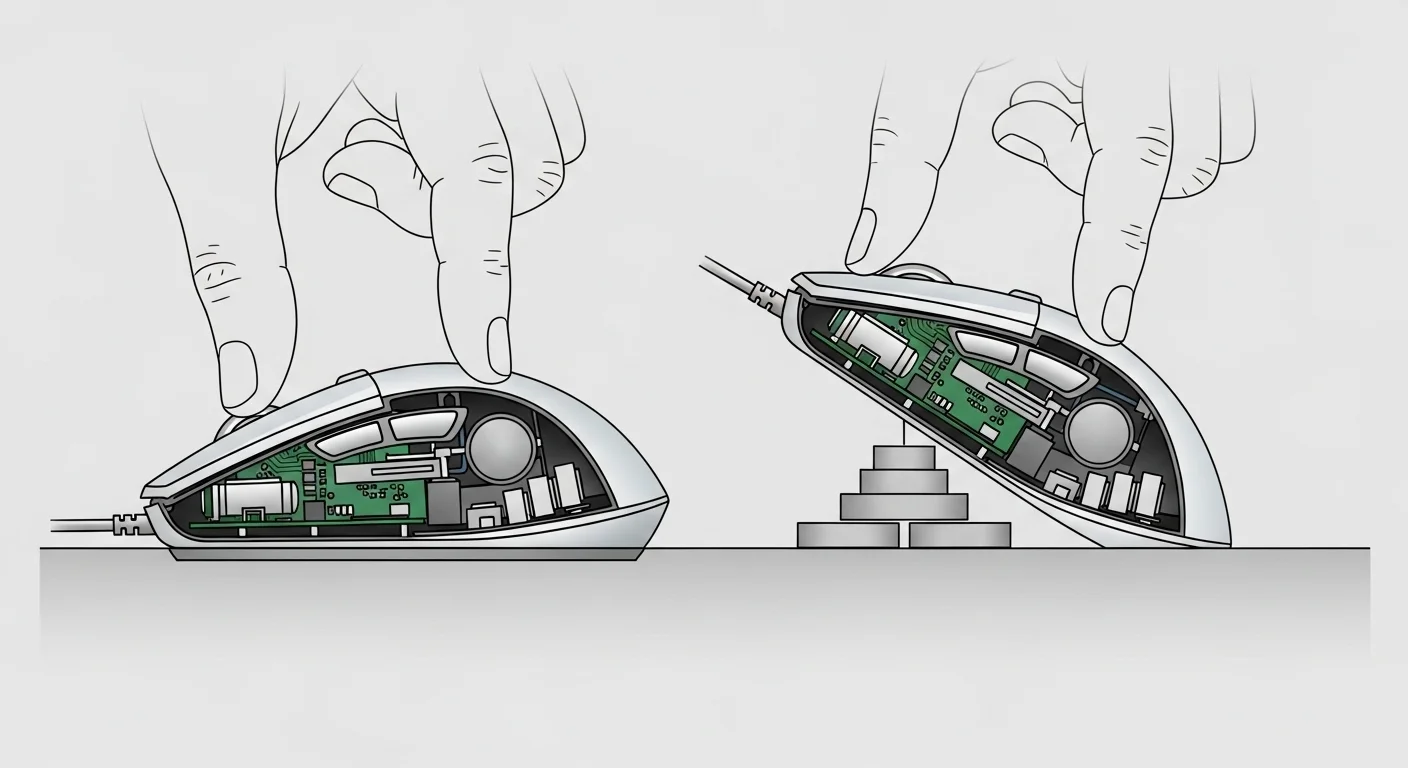
If the mouse is front-heavy, the nose dives into the pad. This tilt alters your sensor’s lift-off distance and ruins your crosshair placement.
A neutral CoG ensures the mouse stays parallel to the mousepad. This consistency is vital for flick shots and tracking fast targets.
Compare this requirement to other styles in our Best FPS Mouse Grip guide to see why balance is unique to fingertip users.
Weight Distribution Effects on Aim
| Distribution Type | Physical Effect | Impact on Aim |
|---|---|---|
| Front-Heavy | Nose dives on lift | Scrapes pad, causes sensor spin-out |
| Rear-Heavy | Nose lifts up | Loss of tracking, unstable reset |
| Neutral (Ideal) | Stays flat | 1:1 movement, consistent tracking |
Don’t fight your hardware. Aim for that <60g sweet spot with a balanced core to unlock your true potential in the server.
In Short
- Mice weighing under 60g are critical for fingertip grip to minimize inertia and reduce finger fatigue during rapid movements.
- A neutral center of gravity is essential to keep the mouse flat during lifts, preventing sensor tracking issues caused by tilting.
