

Your monitor just flunked the backlight bleed test.
That faint glow creeping in from the edges isn’t just an ugly flaw, it’s a performance killer that can mask an enemy hiding in the shadows and cost you the win.
A perfect display isn’t a luxury; it’s essential for dominating the competition.
Don’t just live with a compromised display.
This guide is your tactical playbook for dealing with backlight bleed.
We’ll arm you with the steps to mitigate the issue, from simple settings tweaks to knowing exactly when to demand a replacement.
It’s time to take control and ensure your hardware is as battle-ready as you are.
Key Takeaways
- First, try to minimize backlight bleed by lowering your monitor’s brightness and adjusting contrast settings.
- Learn to distinguish between backlight bleed (a manufacturing defect) and IPS glow (an inherent panel trait).
- If settings adjustments fail, carefully updating drivers or gently massaging the bezel can sometimes fix the issue.
- When bleed is severe, document the problem and check your warranty for a return or RMA to get a flawless display.
Understanding Backlight Bleed & Proper Testing
What is Backlight Bleed?
Backlight bleed is light leakage from your monitor’s backlight shining through the edges or corners of your screen.
It creates uneven bright spots, especially noticeable when your display shows dark images or in a dimly lit room.
This isn’t just an aesthetic flaw- it significantly impacts visual quality and immersion in your favorite games.
Why Backlight Bleed Kills Your Gaming Performance
For competitive gamers, every visual detail gives you an edge. Backlight bleed can obscure crucial elements in dark scenes.
Imagine missing an enemy hiding in shadows because a bright patch on your screen masked them. That’s a direct loss.
It also breaks immersion, pulling you out of the intense game world. You need a perfect display to truly dominate.
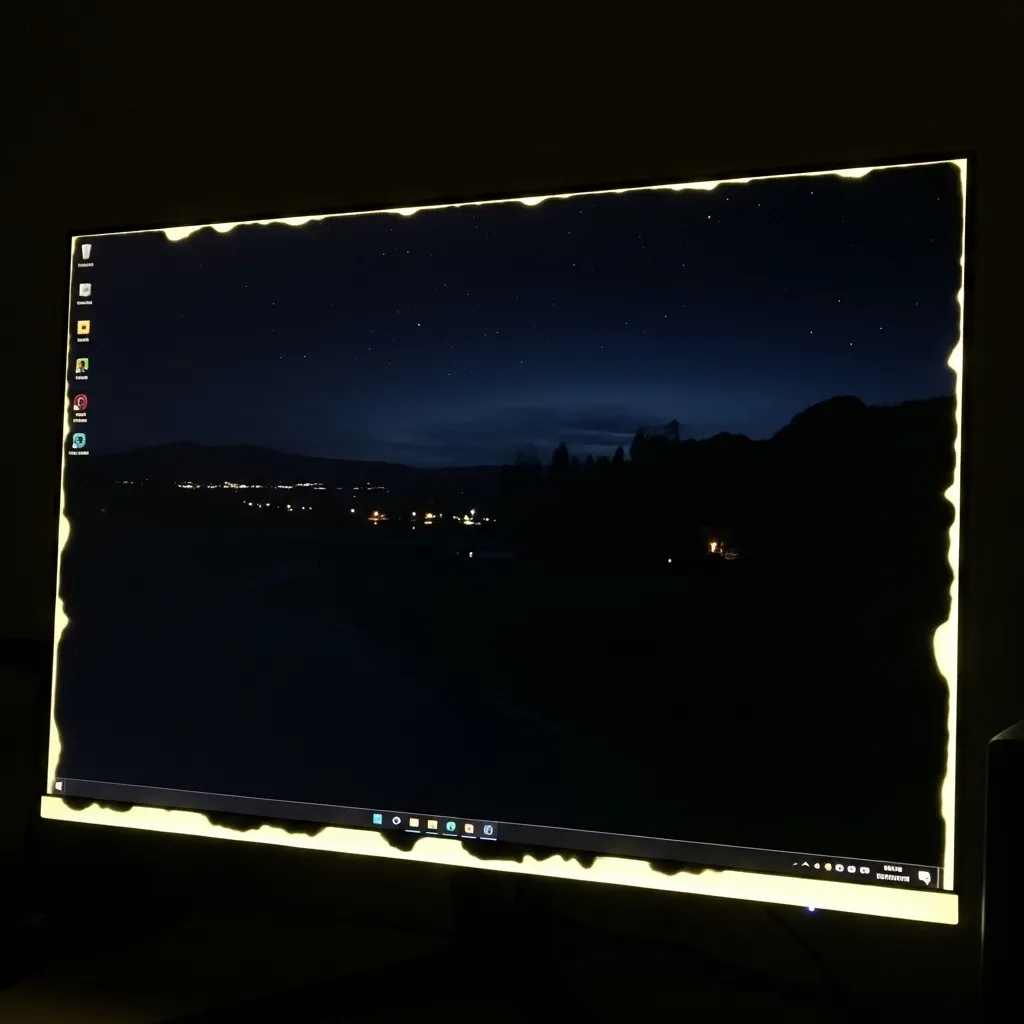
Mastering the Backlight Bleed Test
Don’t just guess if your monitor has backlight bleed. Test it properly to know the real score.
Here’s how to conduct a thorough evaluation:
- Set the Scene: Turn off all lights in your room. The darker, the better.
- Full Black Screen: Open a full-screen, completely black image or video on your monitor. Our Display Backlight Bleed Test tool on Joltfly is perfect for this.
- Observe: Look for any brighter areas, especially around the edges or corners.
- Adjust Brightness: Try lowering your monitor’s brightness. Sometimes, bleed is less noticeable at lower settings, but it’s still present.
- Check Viewing Angles: Shift your head slightly. Sometimes, “IPS glow” (a similar phenomenon) can be mistaken for bleed, which changes with viewing angle.
A consistent bright patch regardless of your viewing angle indicates true backlight bleed.
The Impact on Gamers – By the Numbers
Gamers prioritize display quality. Don’t let backlight bleed compromise your setup.
A bar chart showing top monitor priorities for gamers: Display Consistency (72%), Refresh Rate (68%), Response Time (65%), Color Accuracy (58%), Size & Resolution (50%).
A 2023 report from Display Daily indicated that display consistency is a top priority for over 70% of professional gamers and content creators.
This stat underscores why backlight bleed is a critical issue that demands your attention.
Beyond backlight bleed, ensuring optimal black levels on your monitor is essential for visual superiority.
Level Up Your Visuals with Joltfly
Ready to ensure your monitor is battle-ready? Head over to Joltfly.
Use our Display Backlight Bleed Test now to pinpoint any weaknesses in your display.
Challenge your gaming circle to see whose monitor is truly flawless. Dominate your visual experience!
Differentiating Backlight Bleed vs. IPS Glow
Ready to level up your monitor knowledge?
Understanding the difference between backlight bleed and IPS glow is crucial for any serious gamer.
These aren’t the same issues, even though they can look similar in dark scenes.
Mistaking one for the other can lead to unnecessary frustration or even returning a perfectly good monitor.
Let’s break down these visual phenomena so you can properly diagnose your display.
What is Backlight Bleed?
Backlight bleed is a hardware defect.
It occurs when light from your monitor’s backlight “bleeds” through the edges or corners of the panel.
This creates uneven patches of brighter light, especially noticeable on dark screens.
Think of it as light escaping where it shouldn’t.
It’s often due to inconsistent manufacturing pressure on the panel or improper assembly.
This is an actual flaw in the monitor’s construction.
Backlight bleed typically appears as yellowish or whitish patches.
These spots remain consistent regardless of your viewing angle.
It’s a persistent flaw that impacts your visual experience in darker games.
What is IPS Glow?
IPS glow, on the other hand, is an inherent characteristic of In-Plane Switching (IPS) panel technology.
It’s not a defect. It’s a phenomenon where a luminous “glow” appears at extreme viewing angles.
This glow usually manifests as a silvery or yellowish sheen. It tends to change in intensity and color as you shift your head.
The effect is most prominent in dark environments and when viewing dark content.
IPS glow is a byproduct of how IPS panels work.
The liquid crystals don’t perfectly block light from certain angles.
It’s present to some degree on almost all IPS monitors, unlike backlight bleed.
Spotting the Differences: Backlight Bleed vs. IPS Glow
Knowing which issue you’re facing is key to deciding your next move. Here’s a quick breakdown to help you differentiate these display quirks:
- Cause: Backlight bleed is a manufacturing defect; IPS glow is an inherent characteristic of IPS panels.
- Appearance: Bleed often shows as distinct bright spots or patches. Glow is more of a diffused, ethereal sheen.
- Color: Bleed is typically yellow or white. Glow can be silver, yellow, or even slightly green/blue depending on the angle.
- Consistency: Backlight bleed areas stay fixed. IPS glow shifts and changes as you move your head or adjust your sitting position.
- Impact: Bleed is usually more distracting and uniform across angles. Glow only appears at specific, often off-center, viewing angles.
To accurately test your monitor, especially for dark level issues, you can use specialized tools.
A good starting point is the Display Black Level Test on Joltfly.
It helps expose these inconsistencies.
Your Next Move
Now that you know the difference, you can approach any monitor issues with confidence.
If you’ve got true backlight bleed, you might consider contacting your monitor’s manufacturer or retailer for support.
If it’s IPS glow, remember it’s a common trait of IPS panels.
Adjusting your viewing angle or room lighting can often minimize its impact.
Don’t let minor glow hold you back from dominating your games!
Keep honing your gaming setup. Head over to Joltfly for more device tests and improve your competitive edge!
In Short
- Backlight bleed is a hardware defect where light leaks from a monitor’s backlight, creating uneven bright spots that negatively impact visual quality and gaming immersion.
- To properly test for backlight bleed, observe a full black screen in a dark room, noting that true bleed shows consistent bright patches regardless of viewing angle.
- Display consistency, which is compromised by backlight bleed, is a top priority for gamers and essential for competitive performance.
Your Actionable Pathway: A Step-by-Step Guide
Initial Assessment: Don’t Panic, Optimize!
So your monitor flunked the backlight bleed test? Don’t rage quit! This is a common hurdle, and you’ve got actionable steps to tackle it.
First, stay calm. Many monitors exhibit some degree of backlight bleed. Your goal is to minimize its impact on your competitive gaming edge.
A bar chart showing reported backlight bleed severity: None/Negligible (60%), Minor (30%), Moderate to Severe (10%). Data from a Puget Systems survey.
A survey by Puget Systems indicated that about 10% of users reported moderate to severe backlight bleed on their monitors.
Step 1: Re-Test and Verify
Before anything else, run the test again. Slight variations in room lighting or viewing angle can affect results.
Ensure your testing environment is as dark as possible. This reveals the true extent of the bleed.
Use a reliable tool for consistent results. Joltfly’s display tests are built for precision.
Step 2: Adjust Monitor Settings
Often, minor adjustments can significantly improve the situation. Dive into your monitor’s OSD (On-Screen Display) menu.
- Lower Brightness: Reducing overall brightness is the quickest fix. Backlight bleed becomes less noticeable.
- Adjust Contrast: Experiment with contrast settings. Sometimes, a slight tweak here can help.
- Black Level: Fine-tune your black levels. Access Joltfly’s Display Black Level Test to dial it in perfectly.
These adjustments can enhance your visual experience, even if they don’t eliminate the bleed completely.
Step 3: Gently Massage the Bezel (Caution!)
This method requires a delicate touch. Backlight bleed can sometimes be caused by uneven pressure on the panel from the monitor’s bezel.
With the monitor off, gently – and we mean gently – rub the areas showing bleed with a microfiber cloth.
Apply minimal pressure, working your way around the edges. This can sometimes redistribute pressure and reduce bleed.
Do NOT press hard or directly on the screen. Too much force can damage pixels or even crack the panel. Proceed with extreme caution.
Step 4: Update Drivers and Firmware
Outdated display drivers or monitor firmware can sometimes contribute to display anomalies.
Visit your GPU manufacturer’s website (NVIDIA, AMD, Intel) for the latest drivers. Also, check your monitor manufacturer’s support page for firmware updates.
Keeping your hardware optimized is key to peak gaming performance and visual fidelity.
Step 5: Calibrate Your Display
A properly calibrated display can make existing bleed less distracting by ensuring accurate colors and tones elsewhere.
Using a hardware calibrator is ideal for professional-grade results. If you don’t have one, software tools can still offer improvements.
Explore Joltfly’s Display Color Calibration Tool to optimize your screen’s output.
Step 6: Assess Warranty & Return Options
If the backlight bleed is severe and distracting, especially after trying the above steps, it might be a manufacturing defect.
Check your monitor’s warranty. Most manufacturers offer a return or replacement policy for significant display issues within a specific period.
Document the bleed with clear photos or videos. This evidence will be crucial for any warranty claim.
Step 7: Consider an Upgrade
Sometimes, an older or budget monitor simply has inherent panel limitations. If you’re serious about competitive play, a premium monitor can be a game-changer.
Look for monitors with superior panel uniformity, often found in higher-end IPS or OLED displays. These minimize backlight bleed risks.
Investing in better display tech means crisper visuals and a more immersive, distraction-free gaming experience.
Push your skills to the max!
After optimizing your monitor, challenge your friends on Joltfly with our various Trainer Games or Device Tests to see who truly dominates the leaderboard!
Step 1: Assess Severity, Warranty Status, and Personal Tolerance
You’ve run the Backlight Bleed Test on Joltfly. You’ve identified some light leakage. Now it’s time to get strategic.
Your first move is to assess the situation.
This involves evaluating the bleed’s severity, checking your monitor’s warranty, and gauging your personal tolerance for the issue.
Evaluate the Bleed’s Intensity
Take your monitor into a completely dark room. Display a solid black image across the entire screen. This highlights any backlight bleed.
Is it a faint glow in the corners, or are there obvious, bright patches of light? The intensity and size of the bleed are critical factors.
Mild IPS glow is often normal. Significant, uneven light leakage is more problematic. It directly impacts dark scenes in your favorite games.
This can ruin immersion and competitive visibility. Compare what you see to examples online to gauge common acceptable levels.
Personal Tolerance – Can You Live With It?
This is where your personal gaming standards come into play. Backlight bleed is subjective.
What bothers one player might be unnoticeable to another. For competitive gamers, display quality is paramount.
Ask yourself: does this bleed distract you during gameplay? Does it degrade the display color range or contrast in dark areas?
If it constantly pulls your focus, it’s a significant issue. Don’t compromise your gaming experience if the bleed is bothering you.
Check Your Monitor’s Warranty
Before you make any moves, understand your warranty. Most manufacturers have specific policies regarding backlight bleed and dead pixels.
Some consider a certain amount of bleed “within spec.” Others offer replacements for even minor issues within a short return window.
Find your monitor’s purchase date. Check the manufacturer’s website or your retailer’s return policy. This info is your leverage.
Don’t hesitate to reach out to their support. Knowing your rights is key to resolving the issue effectively.
Key Factors for Assessment
- Severity: Is it a subtle glow or a bright, distracting patch?
- Location: Does it appear in corners, edges, or the center?
- Impact: Does it affect your gaming performance or enjoyment in dark scenes?
- Cost: How much did you invest? Higher-end monitors should have fewer issues.
- Usage: For competitive gaming, minimal bleed is ideal for peak performance.
Consumer electronics, including gaming monitors, do see returns due to various issues. It’s a common part of the retail process.
In 2022, the overall retail return rate was 16.6%, with electronics seeing a slightly higher rate of 17.6%.
This shows that returning a product due to quality concerns is a recognized part of consumer behavior.
A bar chart showing return rates: Overall Retail (16.6%) and Electronics (17.6%) in 2022.
Now that you’ve assessed the situation, you’re ready to decide on your next tactical move. You’re in control of your display quality.
Step 2: Navigate Your Options (Mitigate, Return, RMA, or Accept)
So, you’ve run the backlight bleed test on Joltfly, and your monitor showed some imperfections.
Don’t panic!
This is a common issue with modern displays, especially high-performance gaming monitors.
Now it’s time to evaluate your options. You’ve got four main paths to consider: mitigate, return, RMA, or simply accept the bleed.
Option 1: Mitigate the Bleed
Sometimes, minor backlight bleed can be lessened. Before you jump to a return, try these tactics to reduce its impact on your gameplay and viewing experience.
- Adjust Brightness: Lowering your monitor’s brightness settings is often the quickest fix. Excessively high brightness can amplify any existing bleed.
- Optimize Settings: Experiment with your monitor’s contrast and gamma settings. Sometimes, fine-tuning these can make the bleed less noticeable during actual use.
- Darker Environment: Play in a well-lit room. Backlight bleed is far more apparent in dark environments.
- Gentle Pressure: Very carefully, apply light pressure to the bezel around the affected area. This can sometimes reseat the panel and reduce pressure points. Be extremely cautious.
- Software Calibration: Use Joltfly’s Display Color Calibration Tool. Proper calibration can improve overall display uniformity and potentially mask minor bleed.
Many modern gaming monitors, particularly those with IPS panels, commonly exhibit some degree of backlight bleed or “IPS glow.”
For example, in Q3 2023, IPS panels represented over 65% of the gaming monitor market.
A pie chart showing gaming monitor market share by panel type in Q3 2023: IPS (65%), VA (25%), and TN (10%).
Given the prevalence of IPS, a small amount of bleed is often expected and not always considered a defect.
Option 2: Return to Retailer
If the bleed is significant and detracts from your gaming immersion, or if mitigation efforts fail, you might consider returning the monitor.
This is your strongest option if you’re within the retailer’s return window, typically 14-30 days.
Check the retailer’s specific return policy immediately. Most stores have clear guidelines on what constitutes a defect for a full refund or exchange.
Option 3: RMA (Return Merchandise Authorization)
Beyond the retailer’s return window, your next step is usually an RMA directly with the manufacturer. This falls under your monitor’s warranty.
An RMA process can be longer and may involve shipping your monitor to a service center. Be prepared for potential downtime without your display.
Manufacturers often have stricter policies on what level of backlight bleed qualifies for a warranty replacement.
Document your issue thoroughly with photos and videos.
Option 4: Accept the Bleed
Sometimes, the backlight bleed is so minor that it’s only visible on specific test patterns or during completely dark scenes in games.
If it doesn’t impact your daily use or competitive performance, accepting it might be the most practical solution.
The hassle of returning or RMAing might not be worth it for a barely noticeable imperfection.
Ultimately, the decision is yours.
Weigh the severity of the bleed against the time and effort required for a replacement.
Your gameplay experience is paramount.
In Short
- Initial steps to address backlight bleed include re-testing in a dark environment and adjusting monitor settings like brightness and contrast.
- Further improvements can be made by gently massaging the bezel, updating drivers and firmware, and calibrating the display.
- If the bleed remains severe, users should consider warranty options or upgrading to a higher-quality monitor.
